Half-hour demo, no strings attached

Every meeting write-up, filed where it belongs

Meeting Intelligence reads the write-ups from your note-taking tool, works out whether the meeting was internal, with a client or with a prospect, and files it in the right folder. With the reasoning attached, so you can see why.

No sales track: half an hour tells you what it does with your meetings.

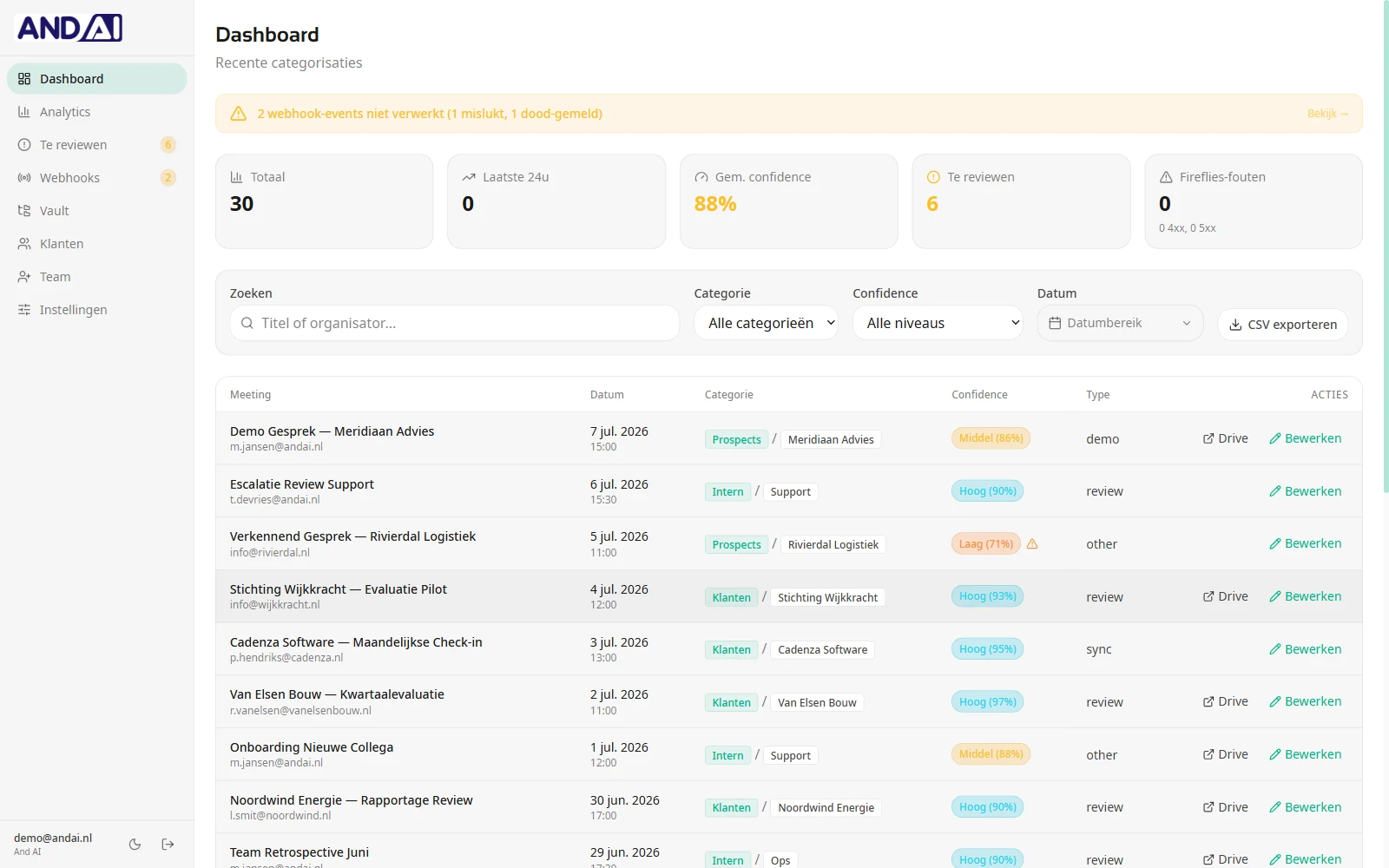
Dashboard listing recent meetings, each with a category and a confidence score
In doubt, a human decides, not the model
"The AI sorts, and when it is unsure a human decides. That order is fixed, and you set where the line sits." The premise behind Meeting Intelligence
Meeting Intelligence

From loose write-ups to an archive that is still useful later

Human control

Doubtful cases come to you, not to a folder

A model that is occasionally wrong is fine, as long as it tells you when it is unsure. That is what this is built around.

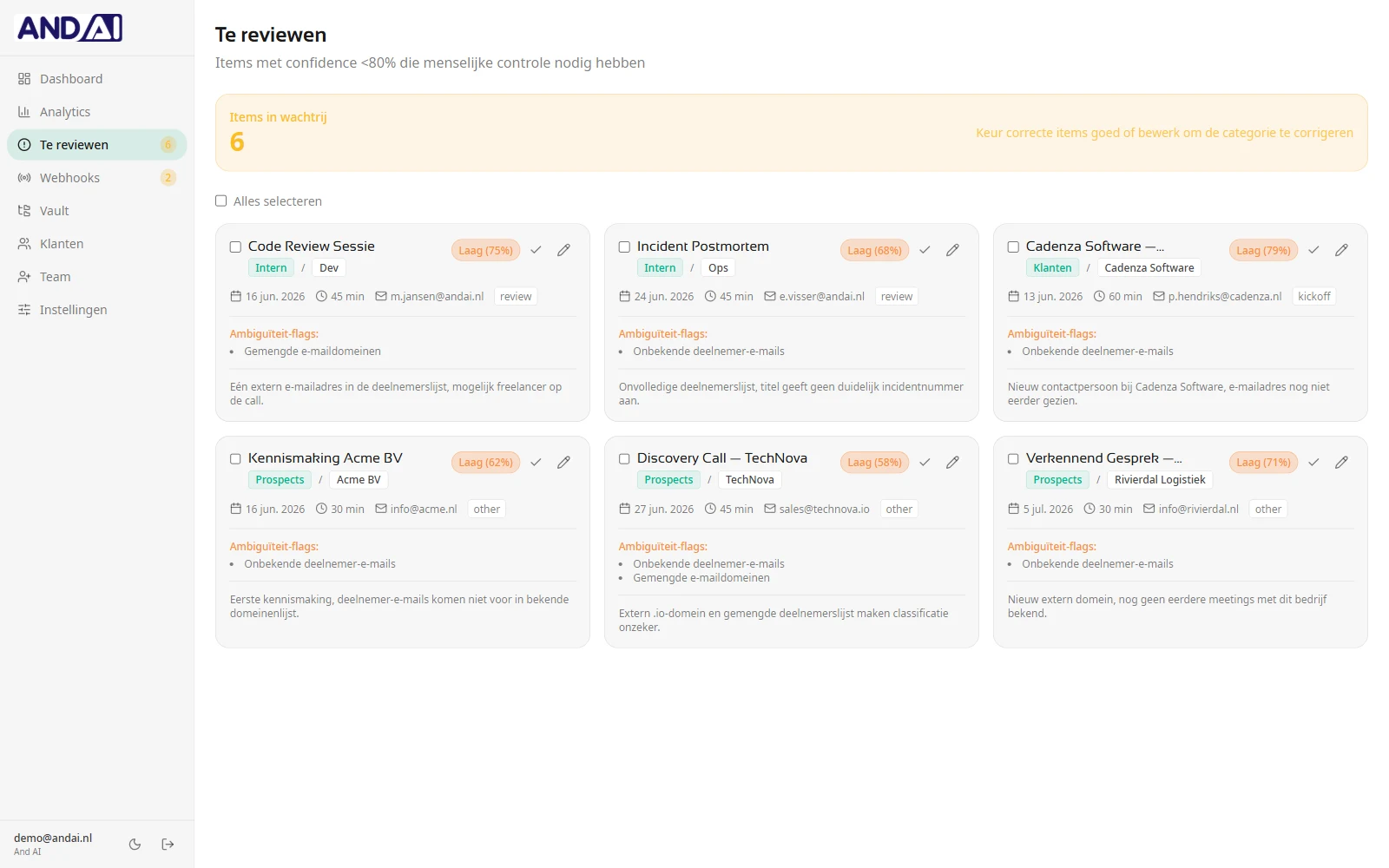
  • Anything below your threshold lands in the review queue
  • Per meeting you see why it hesitated
  • Approve or correct in one click, in bulk too
  • Below the lowest threshold: human required, plus a Slack alert
Review queue showing each meeting's confidence score, ambiguity flags and the reason for the doubt
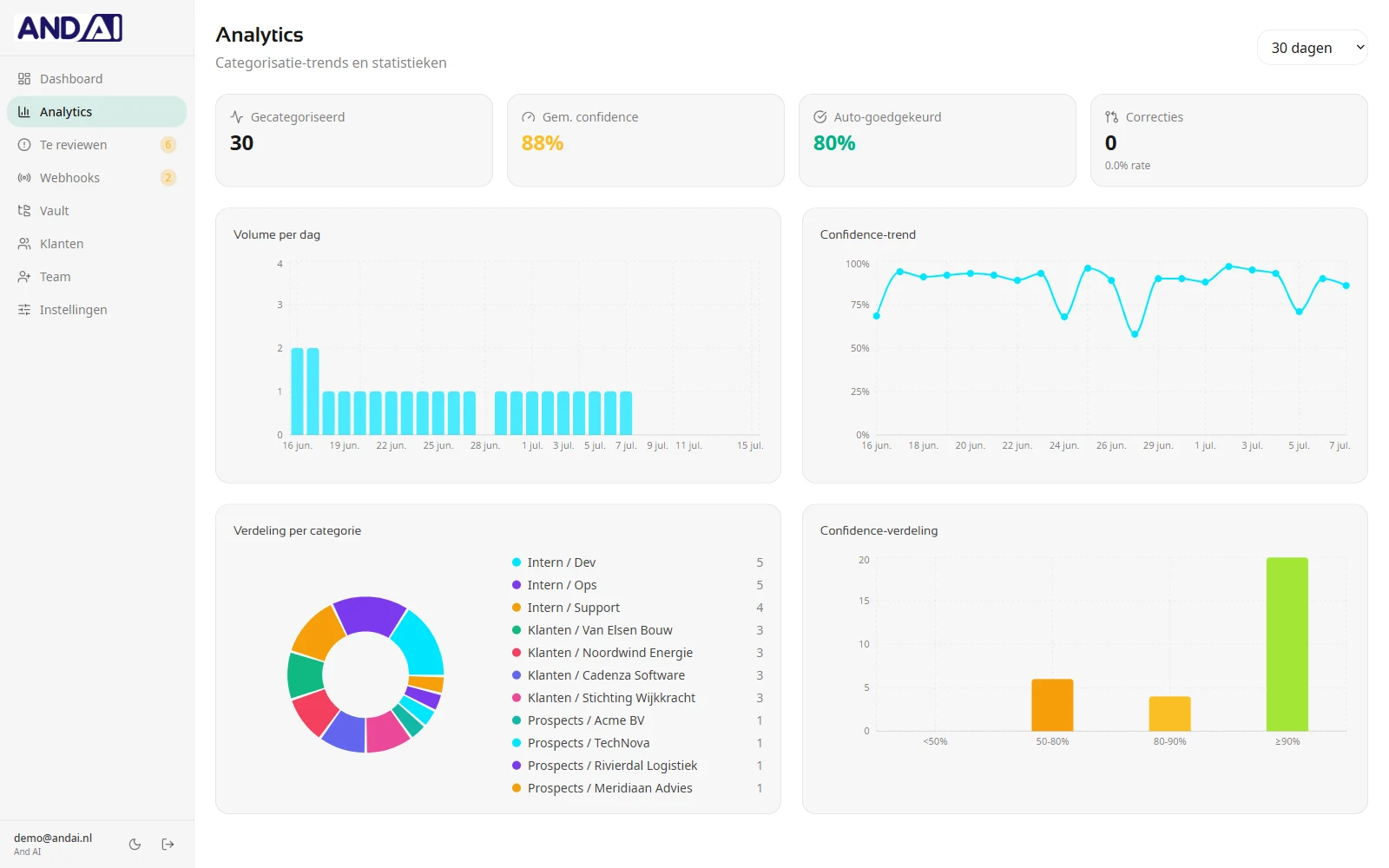
Analytics with daily volume, a confidence trend and the breakdown per category
Insight

You see what the system does, not just that it runs

How sure has it been these past weeks, and how often did you have to correct it? Without those numbers you cannot tell whether to trust it.

  • Daily volume and how confidence moves over time
  • Breakdown per category and per client
  • How much gets approved automatically, and how much you correct
  • Failed events stay visible in the webhook queue
Control

You set the thresholds, we do not

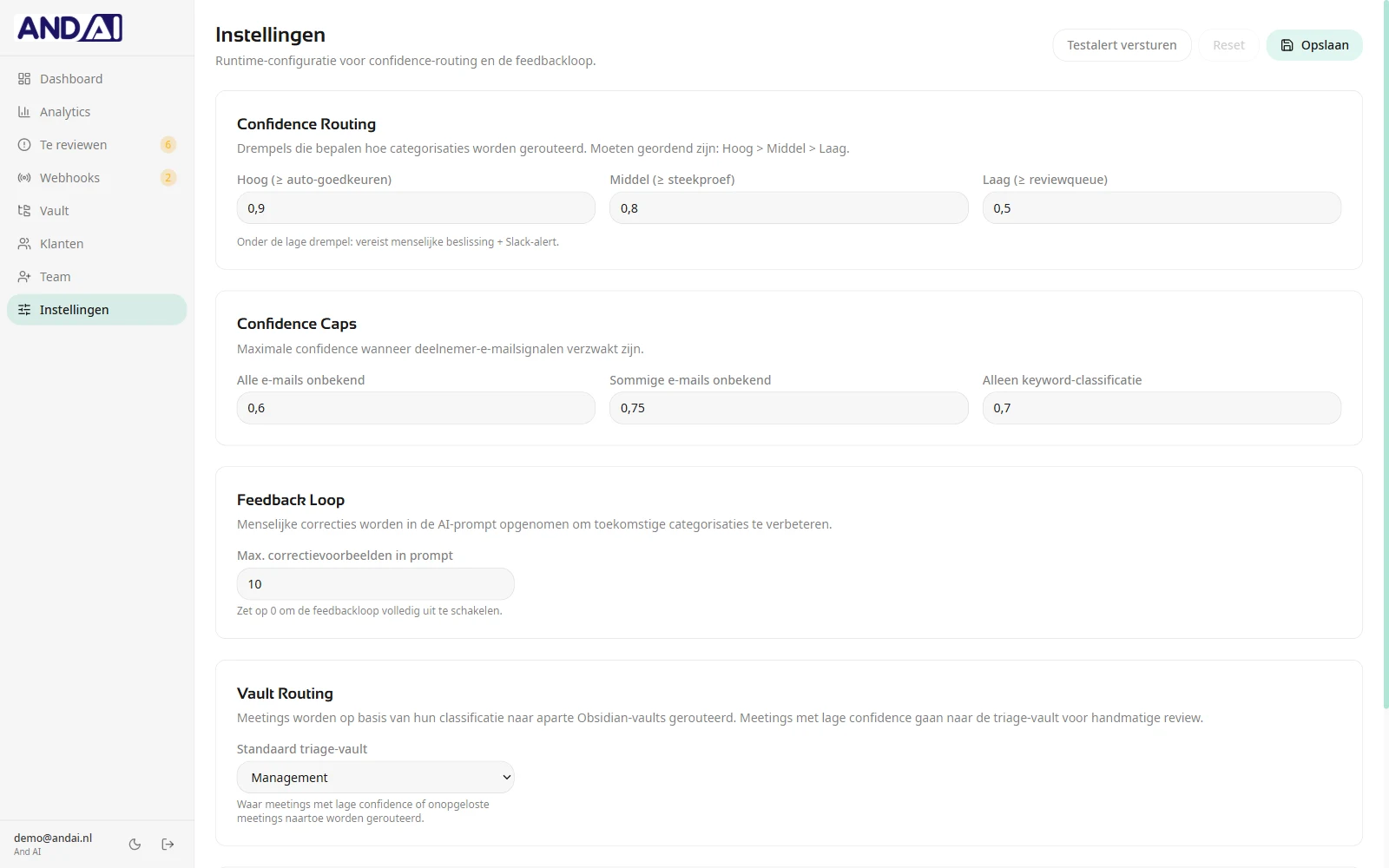
Want more of it passing a human first? Move the threshold up. It applies straight away, without anyone having to ship a release.

  • Thresholds for auto-approval, sampling and review
  • Confidence caps for when participant signals are weak
  • A feedback loop built on your corrections, or none at all
  • Per category you decide which folder it lands in
Settings screen with confidence routing thresholds, caps and the feedback loop
How it works

Three steps, none of which are yours

Unless the system hesitates. Then it is your turn, and that is exactly the point.

1

The write-up arrives

Your note-taking tool, Fireflies for instance, delivers the write-up as soon as the meeting ends. Nobody has to upload a thing.

2

The system sorts it

Internal, client or prospect, based on the participants and the content. With a score for how sure it is and an explanation of why.

3

Filed, or handed to you

Sure enough: straight into the right folder. Unsure: into the review queue, with the flags that explain the doubt.

Three colleagues wrapping up a meeting at a boardroom table
The result

Your notes become an archive instead of a pile

A write-up that belongs nowhere is a write-up you will not find again in six months. Once every meeting sits with the right client, "what did we agree again" is a question with an answer.

3 categories
internal, clients and prospects, reasoned per meeting
Below your line
a human decides, not the model
Sound familiar?

The problem is not the note-taking

Note-taking tools write perfectly good summaries. It goes wrong in what happens to them afterwards, or rather what does not.

Looking things up

"What did we agree again?"

The agreement is in a write-up. Which one, nobody remembers. So it gets discussed all over again.

Archive

Everything lands on one pile

Internal stand-ups, client calls and first conversations sit side by side. Anyone after one client's history scrolls forever.

Handover

New colleague, old conversations

Whoever takes over an account starts from nothing, while the history is right there. Just not anywhere you can find it.

The demo

Look first, decide after

No proposal process up front. We show it and start from your situation.

NO STRINGS ATTACHED

Half-hour demo

Online, with someone who built it. Not a salesperson who has to look up the answer.

  • We walk through the system in a working environment
  • You tell us how you take notes now and where it stalls
  • We say so plainly if it is not a fit
  • After that you get a proposal for your situation, or you do not
Book a demo

Rather email first? [email protected]

Frequently asked

Worth knowing

Where do the write-ups come from?

From the note-taking tool you already use, Fireflies for example. As soon as a write-up is ready there, it arrives through a webhook and goes through categorisation. Nobody has to upload anything.

What happens when the system is unsure?

The meeting goes to the review queue instead of into a folder. Per meeting you see why it hesitated, for instance mixed email domains or a participant it has not seen before. You approve or correct the category. Below the lowest threshold a human decision is mandatory and an alert goes to Slack.

Does it learn from our corrections?

Yes. Corrections go back into the prompt as examples, so comparable meetings go better afterwards. You set how many examples travel along, and setting it to zero turns the feedback loop off entirely.

Where are the write-ups stored?

In your own vaults, with a separate folder per category. Clients and prospects each get their own folder. Low-confidence meetings go to the triage vault so they do not end up among the approved material.

Can we set the thresholds ourselves?

Yes. High, medium and low are yours to set, as is the maximum confidence when participant signals are weak. It is runtime configuration: you change it and it applies immediately, without a release.

What if something breaks during processing?

Failed events stay visible in the webhook queue, with the number of attempts and the last error message. You can see when something got stuck, rather than a meeting quietly disappearing.

What does it cost?

That depends on your volume and on what your archive looks like. In the demo we walk through your situation and you get a concrete proposal afterwards.
See it work in half an hour

An online demo with someone who built it. You will also hear when it is not right for you.

Book a demo